One library to read every fitness device.
Add OFP to your app once. You don't maintain code for each device: the community does. New devices come to your app with a simple library update: no code of yours changes.
npm install @openfitnessprotocol/ofp
One library for any JavaScript app · open source · Apache-2.0
OFP reads data. It does not control devices.
Reading fitness data: yes
A Concept2 rower's strokes and watts, a power meter, a heart rate strap, a bike that only broadcasts its numbers, a breathing or temperature sensor. A smart trainer's power and cadence too.
Controlling fitness devices: no
Setting a smart trainer's resistance or ERG mode (a Wahoo KICKR is read, not steered), or changing a treadmill's speed. Your app keeps doing that the way it does now. Control may come later.
Got a device that doesn't work?
Install OFP Studio and test it: wake the device, click Connect, and see what it sends. Then give the recording and this project to an AI assistant (Claude, ChatGPT, any that can read code), and it can set the device up for you. You check the numbers against the device's own display, and send it in.
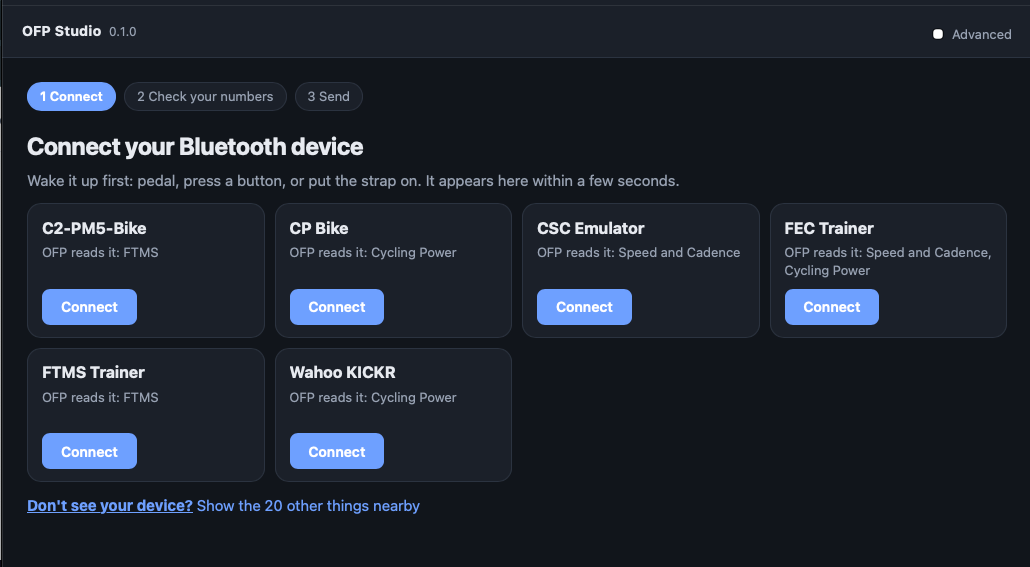
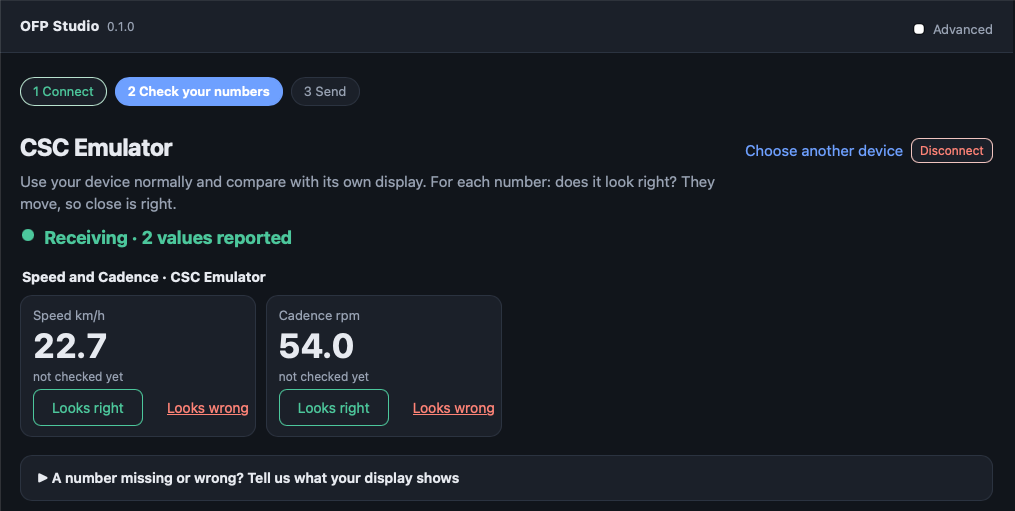
How a device gets in
in OFP Studio, and save the recording.
from the recording and this project.
each value right or wrong, on the device.
an automated check replays your recording.
in every app that uses OFP.
Why
Heart rate, power and smart trainers have Bluetooth standards. Newer sensors (breathing, core temperature, bikes that only broadcast their numbers) don't, so each maker invents a private format and each app has to write code for each device. Most of that code never gets written. OFP puts one open piece in the middle, and its rules live in a public repository, not in a committee.
Devices
Verified device types
Each type checked on a real device, not every model.
- Heart rate straps (Garmin, Polar and others): heart rate and RR intervals for HRV
- Power meters: power, cadence
- Speed and cadence sensors
- Spin bikes and indoor bikes with the Bluetooth fitness machine standard (FTMS): Schwinn IC4 / Bowflex C6, Stages, newer Yesoul and Domyos, and many more
- Keiser M3i bike
- Rowers with FTMS: Concept2 and others
- Treadmills with FTMS
Supported, not yet verified
OFP reads them; no owner has checked one yet.
- Running speed and cadence sensors
- CORE body temperature sensor
- Tymewear VitalPro breathing sensor
- Domyos bikes without FTMS, older Yesoul, iConsole+ consoles, Nautilus
- Inspire IC, XCX, Chrono bikes
Have one of these? Please verify it. Or add your own device. Connect it in OFP Studio, check the numbers, and send it.
Smart trainers (Wahoo KICKR, Tacx, Elite, Saris, Wattbike and others) are read too, power and cadence, but read only: OFP does not set their resistance or ERG mode. Your app keeps controlling them the way it does now, so there is usually little reason to read them through OFP.
OFP is new: this is its first version, and things can still change before 1.0.